
ImageBrowserPro / Grading and critique
Rubrics, markup, voice, and a revision students can open.
Score each photograph against criteria, draw on the frame, record your reasoning, and return feedback in a format the student can read next to their own work.
Grading workflow
01
Build the rubric
02
Import the work
03
Score and comment
04
Save and verify
05
Return feedback
Draw / Mark the image
Explain the picture without changing it.
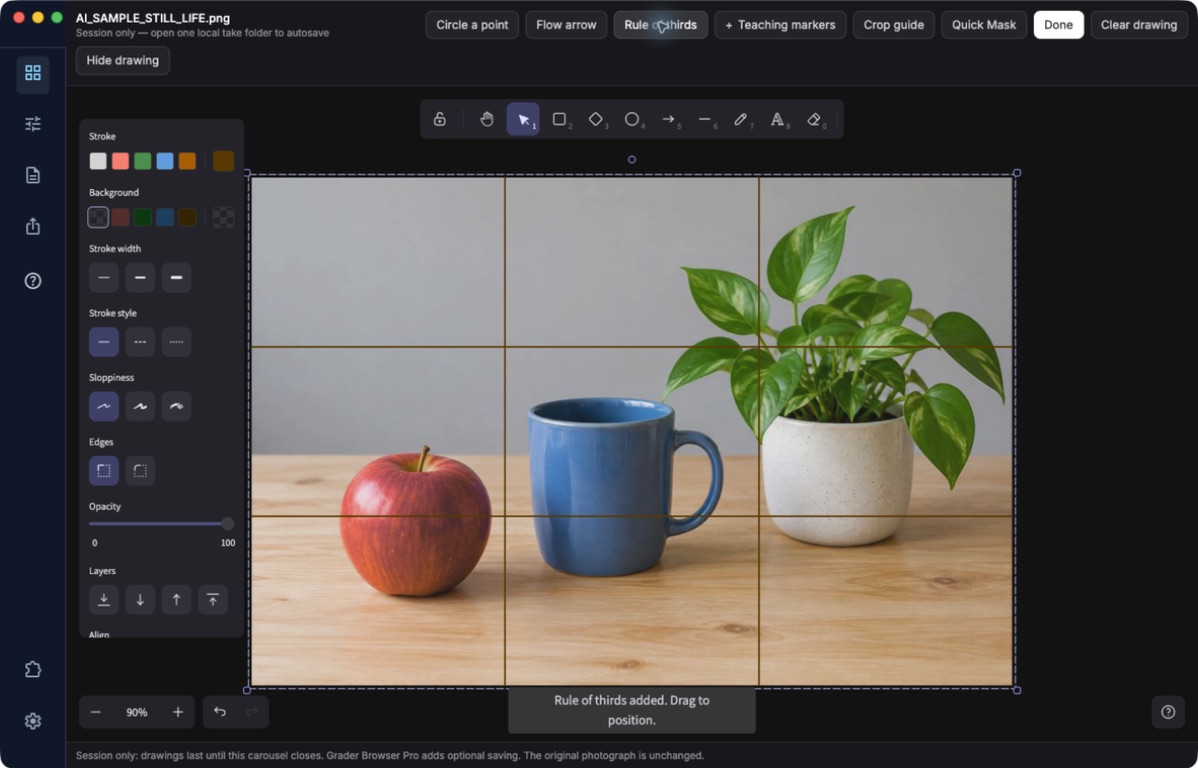
Work Mode locks the full photograph behind a drawing canvas. Use pen and shapes, flow arrows, point circles, rule-of-thirds and golden-ratio guides, and sticky notes in six colors. The teaching crop guide shows a possible frame as a demonstration overlay, not a destructive crop.
You can place up to five extra photographs from the grid onto the canvas to compare frames. Hide or show all markup to flip between your notes and the clean image, and keep drawing while the Image Recorder captures your voice and screen.
Built-in screen recorder / Voice commentary
Let them hear your reasoning and see your cues.
Start the recorder, then draw, circle, and point while you talk. Your voice commentary and your visual markup are captured together, so photo students and photographers see exactly where you are looking and hear why.
The recorder lives inside ImageBrowserPro and stays available while you draw, with start, pause, and stop controls. Stopped recordings appear in the open image folder, and you should play one back before you send it. macOS will ask for microphone and screen-recording permission the first time.
Grader Browser Pro / Rubrics
Grade with a rubric you control.
An optional workflow for teachers for repeatable, criterion-by-criterion scoring.
RUBRIC / BUILD
Write it or import it.
Create criteria and point values in the rubric builder, or import the supported CSV format. Review the total before you grade a single image.
SCORES / COMMENTS
Score the photograph, not a form.
Enter scores and comments against the intended criterion while the image stays in view. Reusable critique phrases are there to speed you up, and you check each one fits before saving.
RECORDS / FEEDBACK
Keep an honest record.
Local grading records are kept in the workflow’s database. Professor comments can be written to compatible IPTC/XMP fields, with a clear pending, saved, or failed acknowledgement.

Critique Binders / Return feedback
Send the feedback, not the photographs.
A Critique Binder is a small revision file holding your drawings and written notes. It does not embed the primary photographs, so it travels through the shared class folder you already use. Save it from Export, and the student loads it beside their own copy of the take.
The first matching drawing opens automatically. Your feedback is read-only for the student, who keeps their own notes and drawings in a separate local layer. If a photograph is missing, the student relinks one matching file and the rest are found from its folder.
Built to be checked
Saved, exported, synced, and received are different things.
Teaching depends on feedback actually reaching the student. ImageBrowserPro is deliberately precise about this: it tells you whether a grade was saved locally, whether a file was written, and what still needs a human check. A closed dialog is never treated as proof of delivery, and the guides tell you to test one binder between two real computers before a class depends on it.
If your institution uses Moodle, grade passback is available through an explicit, supported send after your school has approved the configuration. Other learning-management systems are not assumed.
IMAGEBROWSERPRO / GRADING AND CRITIQUE
See it with your own assignment.
Request the beta and we will help you set up a first rubric and critique pilot.
Questions? Email support@smgmediaworks.com